

Support Center
Selling On EagleSaver.com
Using EagleSaver.com
Can you give me an overview of how this works?
You can turn your items into cash in 3 easy steps:
1.Get instant quotes for your items from our website by entering the 10 or 13 digit ISBN code (Books) or the 12 digit UPC code (Audio CDs, DVDs/Blu-rays and Video Games)
2.Complete the order by printing a free shipping label and ship items
3.Get paid by check or PayPal
We keep you informed of your order status each step of the way. E-mails are sent to you when:
1.You have successfully completed your order online
2.We have received your items
3.Your payment has been sent
You can also monitor your order status by logging into your account.
1.Get instant quotes for your items from our website by entering the 10 or 13 digit ISBN code (Books) or the 12 digit UPC code (Audio CDs, DVDs/Blu-rays and Video Games)
2.Complete the order by printing a free shipping label and ship items
3.Get paid by check or PayPal
We keep you informed of your order status each step of the way. E-mails are sent to you when:
1.You have successfully completed your order online
2.We have received your items
3.Your payment has been sent
You can also monitor your order status by logging into your account.
What is an ISBN?
An ISBN is a 10 or 13 digit number that can be found on the back cover of most books. Occasionally, it will be found on the inside flap of the dust jacket or on the publishing information page which is located near the title page of the item.
When you enter the ISBN include all 0's and an X if applicable. Each ISBN should have a total of 10 or 13 digits. Each individual 10 or 13 digit ISBN must be entered without spaces or dashes.
If you have multiple ISBNs, you can enter your ISBNs separated by a space or coma in the EagleSaver.com search bar.
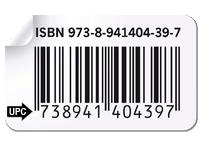
When you enter the ISBN include all 0's and an X if applicable. Each ISBN should have a total of 10 or 13 digits. Each individual 10 or 13 digit ISBN must be entered without spaces or dashes.
If you have multiple ISBNs, you can enter your ISBNs separated by a space or coma in the EagleSaver.com search bar.
What is a UPC?
A UPC is a 12 or 13 (EAN) digit number that can be found below the barcode on your CD, DVD or video game case. Each individual 12 digit UPC or 13 digit EAN must be entered without spaces or dashes.Note: sometimes the lead and ending numbers are smaller than the other 10 numbers; these smaller numbers must also be entered so that the code entered is a total of 12 or 13 digits. If you have multiple UPCs, enter them separated by a space or coma in the EagleSaver.com search bar.
What if my item does not have an ISBN or UPC number?
Currently, for books, we only purchase items that have ISBN numbers.
For CDs, DVDS, Blu-rays and Video Games, in general, we cannot purchase items that do not have a UPC code since this usually indicates it was a low budget release or club edition of the item.
However, there is the case in which the item is a normal studio release and the UPC code is not there because it was on a card that used to be on the back of the item but this card has since been thrown away.
In these cases, it is OK to search Google for the UPC code.
For example, Google “UPC code for Game of Thrones, Season 2, Blu-ray”
IMPORTANT: Please be sure when you get your quote the picture and edition EagleSaver.com shows exactly matches the item you are selling. We appreciate it when stick a note of the UPC code you used to obtain your quote to your item.
For CDs, DVDS, Blu-rays and Video Games, in general, we cannot purchase items that do not have a UPC code since this usually indicates it was a low budget release or club edition of the item.
However, there is the case in which the item is a normal studio release and the UPC code is not there because it was on a card that used to be on the back of the item but this card has since been thrown away.
In these cases, it is OK to search Google for the UPC code.
For example, Google “UPC code for Game of Thrones, Season 2, Blu-ray”
IMPORTANT: Please be sure when you get your quote the picture and edition EagleSaver.com shows exactly matches the item you are selling. We appreciate it when stick a note of the UPC code you used to obtain your quote to your item.
Will I be able to track my order status?
You can track your order status at any time by logging into your account.
We also send you e-mails at these 3 steps of the process:
1.When your order is successfully completed
2.When we receive your items
3.When we issue payment.
We also send you e-mails at these 3 steps of the process:
1.When your order is successfully completed
2.When we receive your items
3.When we issue payment.
Will I incur any fees when I sell back my items?
There are absolutely no fees to use our service. Shipping your items to us is also free when you use our free shipping label.
What if EagleSaver.com decides not to buy some of the items I ship?
Our goal at EagleSaver.com is to pay every quote in full. We are not in the business of nitpicking when examining an order. However, in the event we determine some items do not meet our minimum condition standards or were items we cannot purchase, we will return these items to you FREE of charge. After processing your order, we will outline the items we could not purchase in an email to you. You should respond to this email and tell us whether you want the items shipped back to you free of charge or donated to a local charity.
Why are you not buying some of the items I have entered?
What we buy can change depending on current resale values and the number of copies of the item we have in our inventory. If demand is low for an item or we have an oversupply of the item, we will not purchase it. However, keep in mind, EagleSaver.com purchases the widest variety of books, CDs, DVDs and Video Games so be sure you get a quote from us on all the items you would like to sell.
For disc orders with more than 50 items, we offer an Express Checkout option. All orders that
contain any books do not qualify for the Express Checkout option. Please refer to the Express
Checkout section in our Help center for details.
Do you have any minimum order requirements?
Yes. The order value of items actually shipped must be $10.00 or greater and the minimum average value per an item shipped must be $.50 or greater.
Types of Items We Buy
What kinds of books do you buy and in what condition?
Book Condition Requirements
We do not purchase books with:
We purchase a wide variety of books including nonfiction, current fiction and audio books on CDs (if no discs are missing and all of the discs are in very good condition). We do not buy:
We do not purchase books with:
- Water, moisture damage or mold
- Major wear to the binding
- Large tears to the cover and pages
- Missing pages
- Strong odors (including cigarette and pet odors)
We purchase a wide variety of books including nonfiction, current fiction and audio books on CDs (if no discs are missing and all of the discs are in very good condition). We do not buy:
- Textbooks or workbooks and solution manuals that are companion volumes for a textbook
Note: the system may still allow the buyback of certain textbooks; however, we do not purchase any textbooks so please remove them from your quote - Advance reading copies, promotional copies or uncorrected proofs
- Magazines, calendars or comic books
- Most encyclopedia sets
- Audio books on cassettes
- Pornography or any other explicit material
What kinds of CDs, DVDs and Video Games do you buy and in what condition?
Please make sure your items meet our minimum condition and type requirements as outlined below.
Links to Actual Picture Examples of Discs We Can and Cannot Purchase
We purchase CDs, DVDs and Video Games in New, Like New or excellent condition. The CDs, DVDs and Video Games must play perfectly and not skip.
Disc Condition Requirements
We do not purchase CDs, DVDs and Video Games that:
Disc Type Requirements
We buy a wide variety of CDs, DVDs and Video Games. However, please note: We only buy DVDs that are Region 1 – North American. We do not buy the following
Links to Actual Picture Examples of Discs We Can and Cannot Purchase
We purchase CDs, DVDs and Video Games in New, Like New or excellent condition. The CDs, DVDs and Video Games must play perfectly and not skip.
Disc Condition Requirements
We do not purchase CDs, DVDs and Video Games that:
- Have medium or heavy scratches
- Skip in any section
- Are missing the front or back cover artwork
Disc Type Requirements
We buy a wide variety of CDs, DVDs and Video Games. However, please note: We only buy DVDs that are Region 1 – North American. We do not buy the following
- Used PC or Mac Video Games
- Promotional copies (copies stamped with "Promotional", "For Promotional Use Only" or "Not For Resale")
- Pornography or any other explicit material
- Club edition of CDs or movies (i.e. BMG or Columbia House copies, etc.)
Do you buy items in bulk?
Yes. Bulk checkout allows you to sell multiple copies of the same item using our normal, instant checkout process. Simply enter the ISBN (books) or UPC (discs) of the item you want to sell in bulk. A quote will be instantly returned for a quantity of 1 for this item. Then, all you have to do is adjust the quantity to the number of this title that you would like to sell and hit enter or update quantity. An instant bulk price quote will be returned.
Will you buy more than one copy of the same item?
Yes. However, we do set a maximum quantity we will purchase with an instant price quote.
IMPORTANT: Please do not send more than the maximum quantity on separate orders without contacting us first by email for prior approval.
If you have quantities of items larger than our maximum, please contact us at info@eaglesaver.com and provide us with the ISBNs (for books) or the UPCs (for discs) and the quantities involved and we will promptly get back to you.
IMPORTANT: Please do not send more than the maximum quantity on separate orders without contacting us first by email for prior approval.
If you have quantities of items larger than our maximum, please contact us at info@eaglesaver.com and provide us with the ISBNs (for books) or the UPCs (for discs) and the quantities involved and we will promptly get back to you.
Can I sell my items back to you if I live in another country?
Yes. However, you will be responsible for shipping costs and payment will be issued by PayPal only. Please ship items to:
EagleSaver.com
8200 Cypress Plaza Drive, Suite 403
Jacksonville, Florida 32256
EagleSaver.com
8200 Cypress Plaza Drive, Suite 403
Jacksonville, Florida 32256
Packaging and Shipping Your Items
When will you receive my order?
Our free shipping label provides for FedEx ground delivery which takes between 1-6 business days.
Will I be able to track my package and will it be insured?
A FREE tracking number is included with your FREE shipping label. You will be able to get up-to-date tracking information by logging into your EagleSaver.com account and clicking on the tracking number link. Your order will be insured for $100 per a box using our free FedEx shipping label.
How should I package and ship my items?
1.Include a copy of the packing slip with your items
2.Tightly pack the items in a sturdy box – the less empty space left in the box, the less of a chance the items will shift during transit and become damaged. If you are only sending 1 or 2 items, a bubble envelope will work well.
3.The maximum weight FedEx will allow for Ground shipments is: 150 lbs. However, we recommend that each box weigh less than 50 lbs. to minimize the chance of damage during shipment.
4.Use packing tape to stick our free shipping label on your box or bubble envelope and take to any FedEx or FedEx affiliate office that handles ground packages. You will be able to get up-to-date tracking information by logging into your EagleSaver.com account and clicking on the tracking number link. Your order will be insured for $100 per a box. If you need to find the closest FedEx ground station, FedEx provides a location lookup at FedEx.com. Hit the Locations link and enter your 5 digit zip code. Take note of the FedEx locations that handle ground packages (locations that handle ground packages are color coded Green).
2.Tightly pack the items in a sturdy box – the less empty space left in the box, the less of a chance the items will shift during transit and become damaged. If you are only sending 1 or 2 items, a bubble envelope will work well.
3.The maximum weight FedEx will allow for Ground shipments is: 150 lbs. However, we recommend that each box weigh less than 50 lbs. to minimize the chance of damage during shipment.
4.Use packing tape to stick our free shipping label on your box or bubble envelope and take to any FedEx or FedEx affiliate office that handles ground packages. You will be able to get up-to-date tracking information by logging into your EagleSaver.com account and clicking on the tracking number link. Your order will be insured for $100 per a box. If you need to find the closest FedEx ground station, FedEx provides a location lookup at FedEx.com. Hit the Locations link and enter your 5 digit zip code. Take note of the FedEx locations that handle ground packages (locations that handle ground packages are color coded Green).
Do I need to send my order in one box?
- EagleSaver.com appreciates when you ship your order in the smallest number of boxes. If your order is small, we appreciate when you ship it in one box. However, for safety reasons and to insure that your items will not arrive damaged, we recommend that package weights do not exceed 50 lbs.
- At checkout, you will be given an opportunity to select the number of shipping labels you need for your order. The number of shipping labels available is determined by the dollar amount and size of your order. Note: some orders may not qualify for multiple shipping labels.
- Important: Multiple boxes shipped with the same label (i.e. same tracking number) are not covered under FedEx’s insurance policy and the customer will be liable if these boxes are lost in transit. Therefore, please do not make copies of the same shipping label and place on different boxes. Every box shipped to EagleSaver.com must have a unique tracking number. If you feel you need more shipping labels than the system is allowing, please contact us at info@eaglesaver.com.
Can I only ship some of the Items on the Packing Slip?
If you decide you want to keep some of the items on your order, include the original packing slip but put a line through the title you are not shipping and include the rest.
IMPORTANT: Please make sure your order still meets our minimum order requirements after any adjustments that are made. See FAQ “Do you have any minimum order requirements?”
IMPORTANT: Please make sure your order still meets our minimum order requirements after any adjustments that are made. See FAQ “Do you have any minimum order requirements?”
What if I want to use a different shipping carrier?
If you would like to expedite your order or use another carrier, we will reimburse you the amount that your package would have cost if you had used USPS Media Mail.
Pricing and Payment
How and when will I get paid?
It takes 1-6 business days for your package to arrive and you will be given a payment date at checkout. (The payment date is calculated based on the package shipping the same day you completed the order using our free FedEx shipping label. If the package is not shipped the same day as the order was completed, the payment date must be adjusted accordingly). When your items are received and inspected, we will send payment by check or PayPal within 1 business day. Orders arriving Monday – Friday are processed and paid the next business day. Note: Orders received on Friday may be processed and paid the next business day on Monday. On multiple box orders, the above processing schedule applies when ALL the boxes on the order have arrived.
How does payment by PayPal work?
PayPal is an online service that allows you to receive money electronically.You must setup a PayPal account in order to receive PayPal payments from EagleSaver.com (please visit PayPal.com for details on setting up a PayPal account). You will then provide your PayPal email address on EagleSaver.com during the checkout process.There are no fees to use our payment by PayPal feature.
How long will my price quote be valid for?
Once your price quote is obtained and your order is completed, you have 5 business days to postmark your package in order for your quote to remain valid.
How do you determine your prices for the items you buy?
We continuously monitor the supply and demand of books, CDs, DVDs and video games and set our prices depending on current resale values and the number of copies of the item we have in our inventory.
Do you offer a premium for New items?
No. We are committed to processing orders and getting cash to our customers as quick as possible. We therefore have a policy of accepting all items that satisfy our minimum requirements and issuing a standard payment amount. This avoids the delays that would result from meticulously grading each item we receive.
My Account
Manage My Account
Registering and Sign In Section
In order to sell items on EagleSaver.com, you will need to open an account. Opening an account will enable you to place orders, track the status of your orders, get tracking information and view your order history.
Changing account information
You can easily change your account information by logging in and selecting the My Account link at the top of the page. Once you are on the My Account page, select the Edit Information link. Click the Submit button when you are finished editing your account information and the system will confirm that your profile has been updated. You can also click here to be taken directly to the Edit Information page.
Password Issues
You can always change your password by logging into your account and clicking the Change Password link or simply click here.
If you have forgotten your password, you can reset your password by providing your email address so a temporary password can be sent to you. To reset your password, click here.
If you have forgotten your password, you can reset your password by providing your email address so a temporary password can be sent to you. To reset your password, click here.
EagleSaver.com privacy policy
Closing your account
If you would like to close your account, please contact us by e-mail and provide your name and EagleSaver.com e-mail address. Please make the subject line of your e-mail "Please Close My Account."

Have any Questions?
Call us at (888) 409-7773
Our staff is ready to help
Call us at (888) 409-7773
Our staff is ready to help